Adding a Vehicle
A vehicle gets attached to a customer record before you open a Repair Order against it. This flow is the same whether the customer is Retail, House Charge, or National Account.
When to add
- Right after creating the customer — the customer's screen has Add New Vehicle front and center.
- Later, on an existing customer — pull up the customer and click Add New Vehicle in their vehicles area.
A customer can have any number of vehicles on their record. Each one shows up in the customer's vehicle list with mileage and last service.
The form
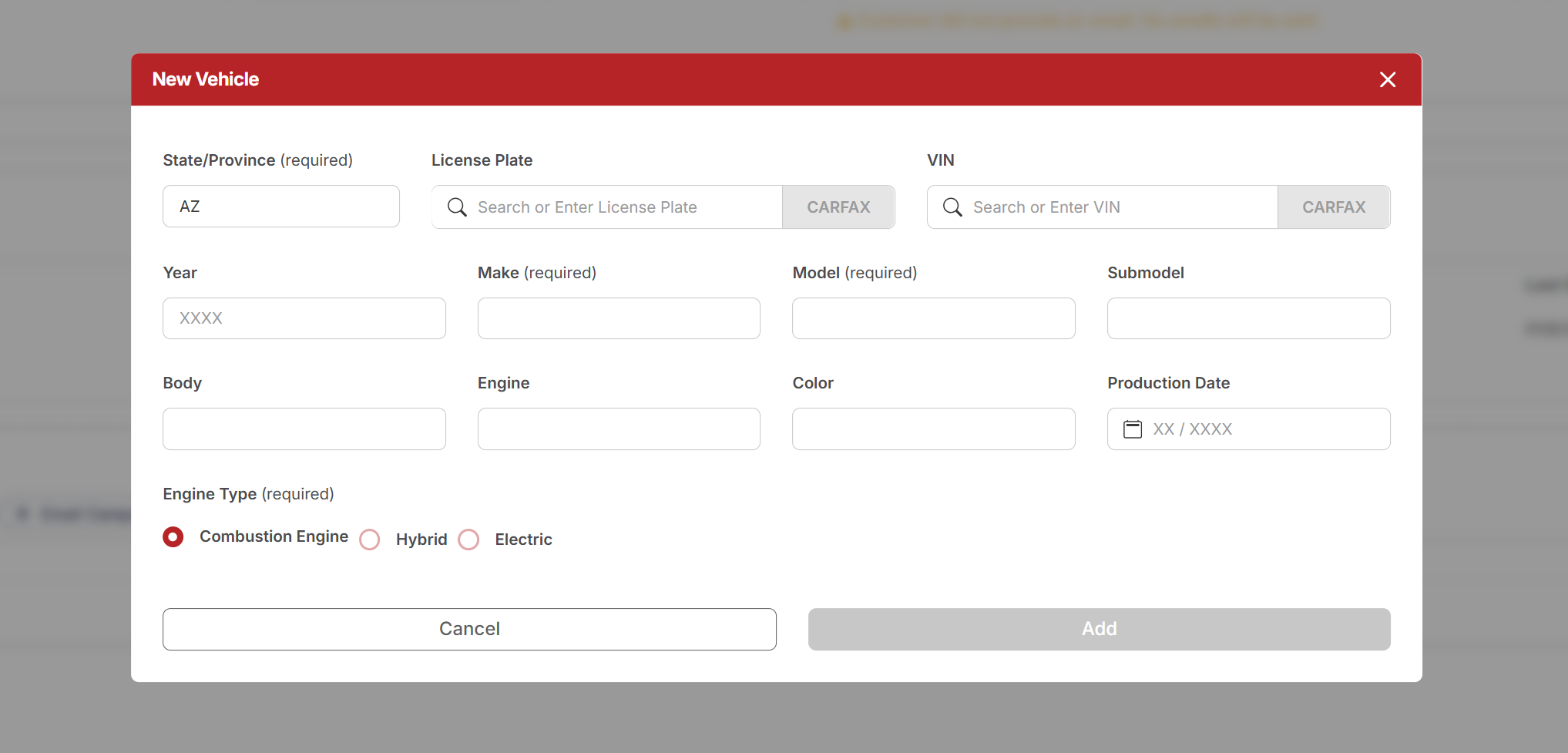
Click Add New Vehicle and you'll see this. Hover (or tap) any number for a quick explanation.
 1
License Plate + CARFAX — type or scan the plate, then click CARFAX. Year, Make, Model, and the VIN all fill in automatically. The most complete path — use this whenever you have the plate.
2
VIN + CARFAX — use if you only have the VIN. Fills in Year, Make, Model, etc., but does not fill the License Plate — you'll need to add the plate separately.
3
State / Province — required. Defaults to your store's state; only change if the plate is from elsewhere.
4
Make — required. Fills in from CARFAX, or pick from the list manually.
5
Model — required. Fills in from CARFAX, or pick from the list manually.
6
Engine Type — required. Combustion is the default. Switch to Hybrid or Electric if the vehicle is one of those.
7
Add — grayed out until every required field is filled. Once it turns red, you're good to save.
1
License Plate + CARFAX — type or scan the plate, then click CARFAX. Year, Make, Model, and the VIN all fill in automatically. The most complete path — use this whenever you have the plate.
2
VIN + CARFAX — use if you only have the VIN. Fills in Year, Make, Model, etc., but does not fill the License Plate — you'll need to add the plate separately.
3
State / Province — required. Defaults to your store's state; only change if the plate is from elsewhere.
4
Make — required. Fills in from CARFAX, or pick from the list manually.
5
Model — required. Fills in from CARFAX, or pick from the list manually.
6
Engine Type — required. Combustion is the default. Switch to Hybrid or Electric if the vehicle is one of those.
7
Add — grayed out until every required field is filled. Once it turns red, you're good to save.
Fields at a glance
| Field | Required? | Notes |
|---|---|---|
| State / Province | Yes | Defaults to your store's state |
| License Plate | No | CARFAX auto-fills the rest of the form from the plate |
| VIN | No | CARFAX auto-fills the rest of the form from the VIN |
| Year | No | Auto-filled by CARFAX |
| Make | Yes | Auto-filled by CARFAX, or pick manually |
| Model | Yes | Auto-filled by CARFAX, or pick manually |
| Submodel | No | Trim level — helpful for parts lookup |
| Body / Engine / Color | No | Optional vehicle details |
| Production Date | No | Month / Year (e.g., 04 / 2018) |
| Engine Type | Yes | Combustion, Hybrid, or Electric |
What a filled form looks like
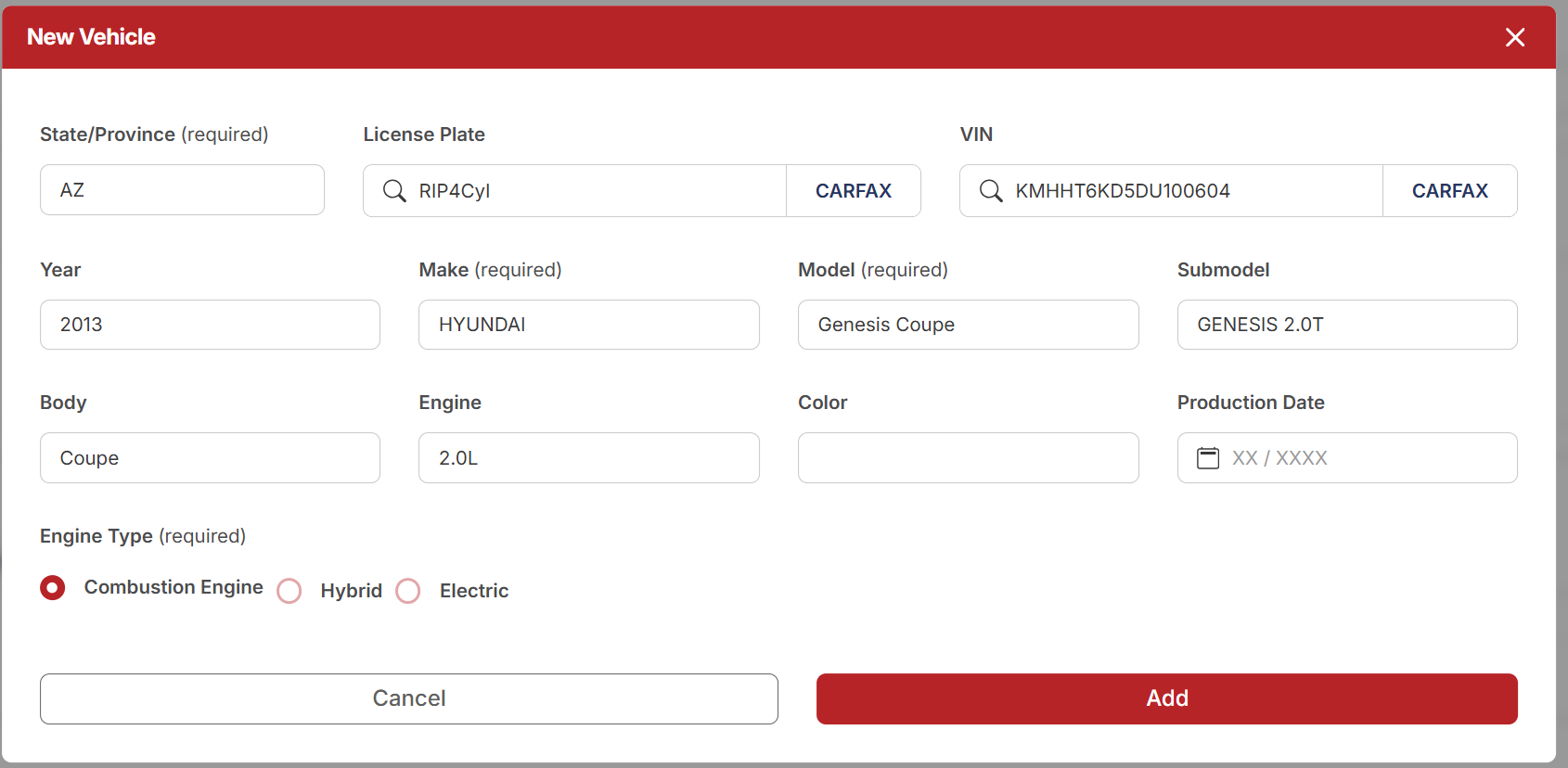
Here's the same form, finished and ready to save:
Watch the flow
The whole thing, end to end:
A few tips
- Lead with the License Plate. Plate + State + CARFAX fills out the whole form including the VIN. Going the other direction (VIN + CARFAX) won't fill in the plate, so you'll have to come back and add it.
- Confirm Make/Model after CARFAX returns — sometimes the result is close but not exact, especially on trim/submodel.
- Engine Type matters for parts and service — don't leave it on Combustion if the vehicle is actually a Hybrid or EV.