Declining and Transferring Jobs
When a customer says no to a Job on the RO — from a DVI finding, an estimate line, or a tech recommendation — you Transfer Job off the active RO. OverDrive moves it to one of two lists on the vehicle's record:
- Declined Services — work that needed to be done today but the customer said no. Brakes, tires out of spec, a safety code, anything Protection-tier.
- Recommended Services — work that's important for the vehicle's long-term health but won't cause long-term problems if it waits. Mileage-based maintenance, fluid exchanges, comfort items — Prevention or Performance-tier.
Either way, the Job leaves the active RO so it doesn't get charged, but it stays on the vehicle's history. Next visit, your team can pick up where this one left off.
Transfer, don't delete
Don't delete a Job because the customer passed. Transfer it. Deleting wipes the breadcrumb — marketing can't follow up, and the next visit's writer can't see what came up last time. Transferring preserves the record (what, who, when).
Declined vs. Recommended
The split is about urgency, not customer sentiment.
| When to pick this | Example | |
|---|---|---|
| Declined Services | Work the vehicle needed today and the customer said no | Worn brake pads, bald tires, dead battery, active safety code |
| Recommended Services | Important for the vehicle's long-term health, but not urgent — won't cause long-term damage if it waits | Cabin air filter, coolant flush at the OEM interval, transmission fluid exchange |
Both lists live on the Services Recommendations tab on the RO — step through the flow below — and carry forward to the next RO opened against this vehicle. The Declined list is also what marketing's 30-day follow-up pulls from — see the Express Lane workflow for the SRR side of the conversation.
The flow
Step through the slides — click the chips at the top, the Previous / Next buttons, or use the ← → arrow keys.
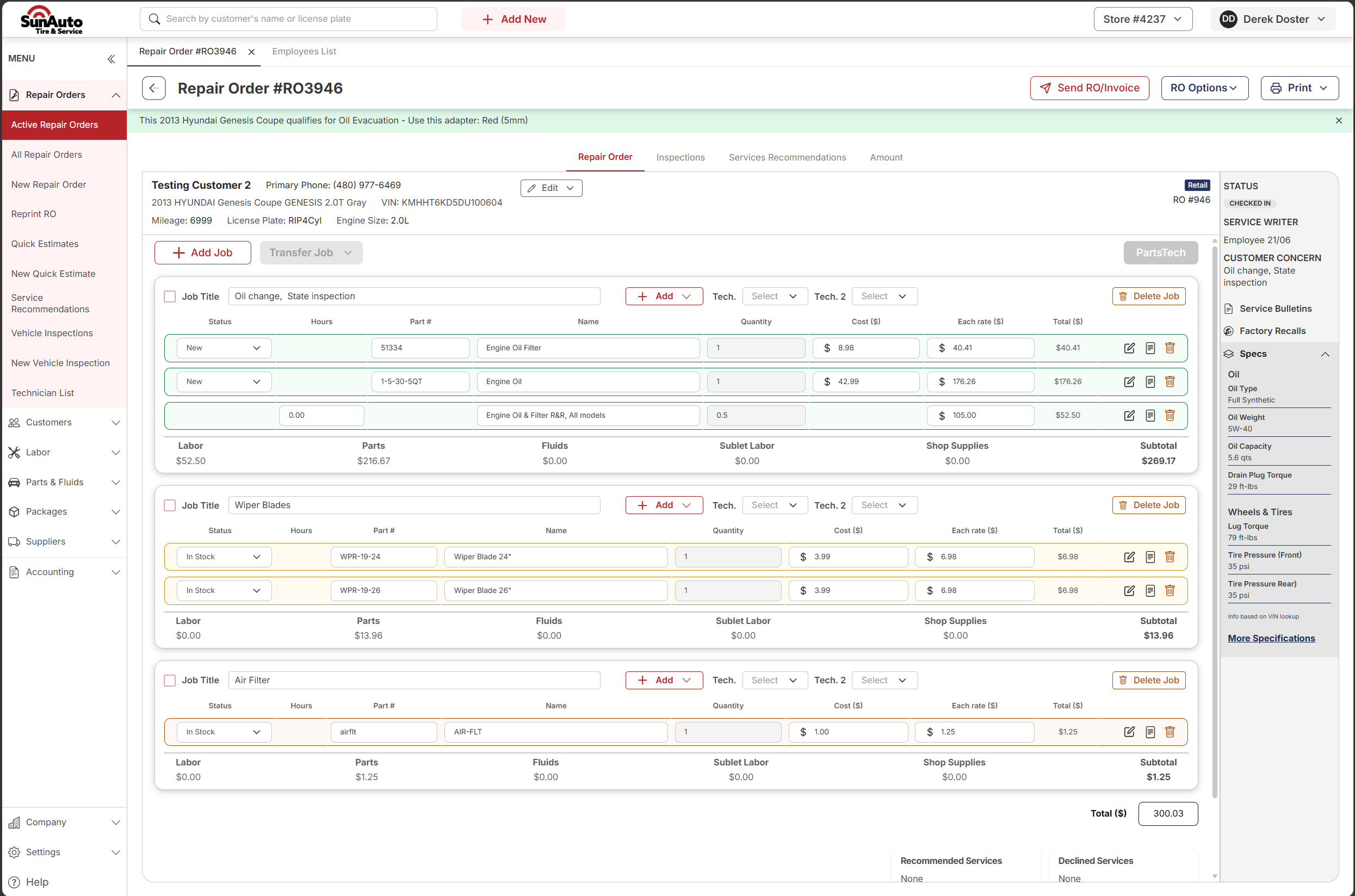
Step 1 — The RO with multiple Jobs. The customer authorized some work but not all. Here on RO #RO3946, the customer is paying for the oil change but passed on Wiper Blades and Air Filter. Each Job has a checkbox on the left so you can pick which ones to transfer.
 1
Transfer Job — the master action button next to Add Job. Opens the destination dropdown once you've picked which Jobs to transfer.
2
Per-Job checkbox — every Job header has one. Ticking it selects that Job for the next bulk action.
3
Jobs the customer declined — Wiper Blades and Air Filter here. The oil change above stays on the RO untouched.
1
Transfer Job — the master action button next to Add Job. Opens the destination dropdown once you've picked which Jobs to transfer.
2
Per-Job checkbox — every Job header has one. Ticking it selects that Job for the next bulk action.
3
Jobs the customer declined — Wiper Blades and Air Filter here. The oil change above stays on the RO untouched.
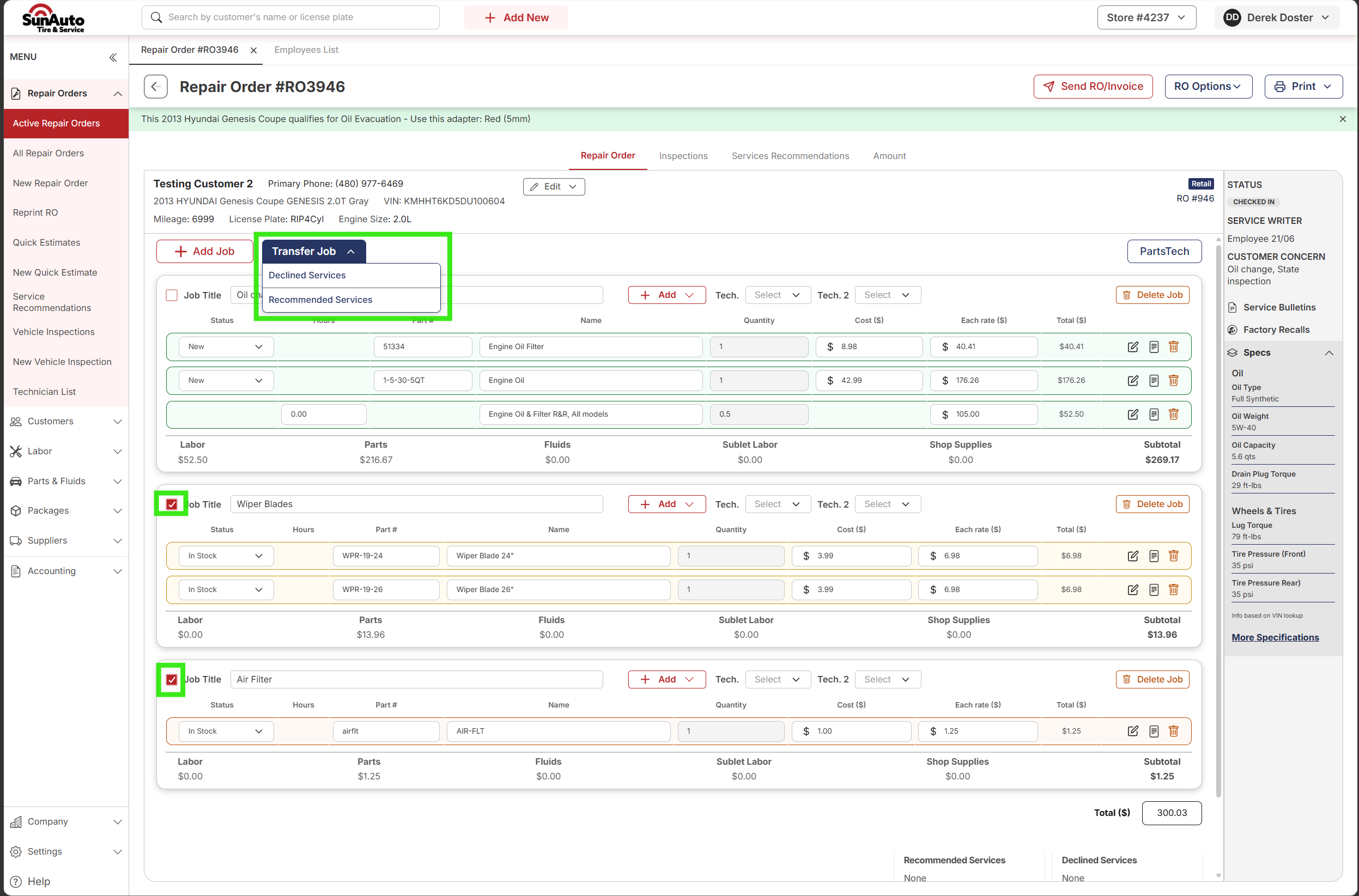
Step 2 — Select the declined Jobs and open the Transfer menu. Tick the checkbox on each Job the customer passed on, then click Transfer Job. A dropdown opens with two destinations.
 1
Transfer Job dropdown opened — two destination options appear below the button.
2
Declined Services — for work the vehicle needed today and the customer said no. Recommended Services — for work that's important for the vehicle long-term but not urgent.
3
Wiper Blades ticked — the checkbox is filled, marking this Job for the transfer.
4
Air Filter ticked — same. Both will move to the chosen destination in one click.
1
Transfer Job dropdown opened — two destination options appear below the button.
2
Declined Services — for work the vehicle needed today and the customer said no. Recommended Services — for work that's important for the vehicle long-term but not urgent.
3
Wiper Blades ticked — the checkbox is filled, marking this Job for the transfer.
4
Air Filter ticked — same. Both will move to the chosen destination in one click.
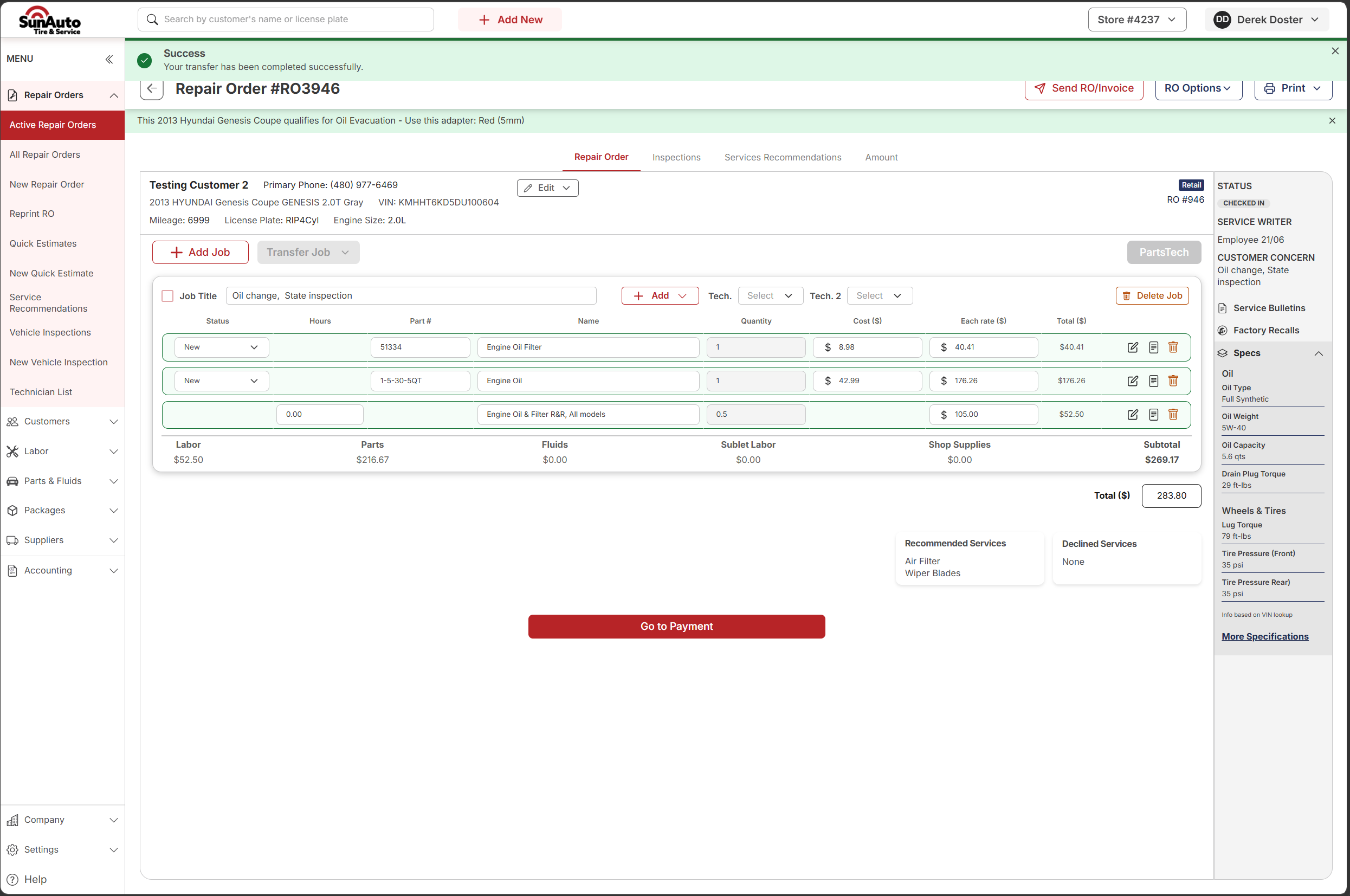
Step 3 — Transfer complete. The success banner confirms it. The transferred Jobs leave the active RO, the RO total drops to just the authorized work, and the right sidebar shows the new Recommended Services list with the Jobs that came off.
 1
Success banner — confirms the transfer completed. Dismisses automatically.
2
Only authorized work remains — the oil change Job. The RO total reflects just what the customer is paying for today.
3
Recommended Services list — the sidebar surfaces the Jobs that came off so the writer can quickly review what's deferred for next visit.
4
Go to Payment — RO is clean, totals are right, ready for checkout.
1
Success banner — confirms the transfer completed. Dismisses automatically.
2
Only authorized work remains — the oil change Job. The RO total reflects just what the customer is paying for today.
3
Recommended Services list — the sidebar surfaces the Jobs that came off so the writer can quickly review what's deferred for next visit.
4
Go to Payment — RO is clean, totals are right, ready for checkout.
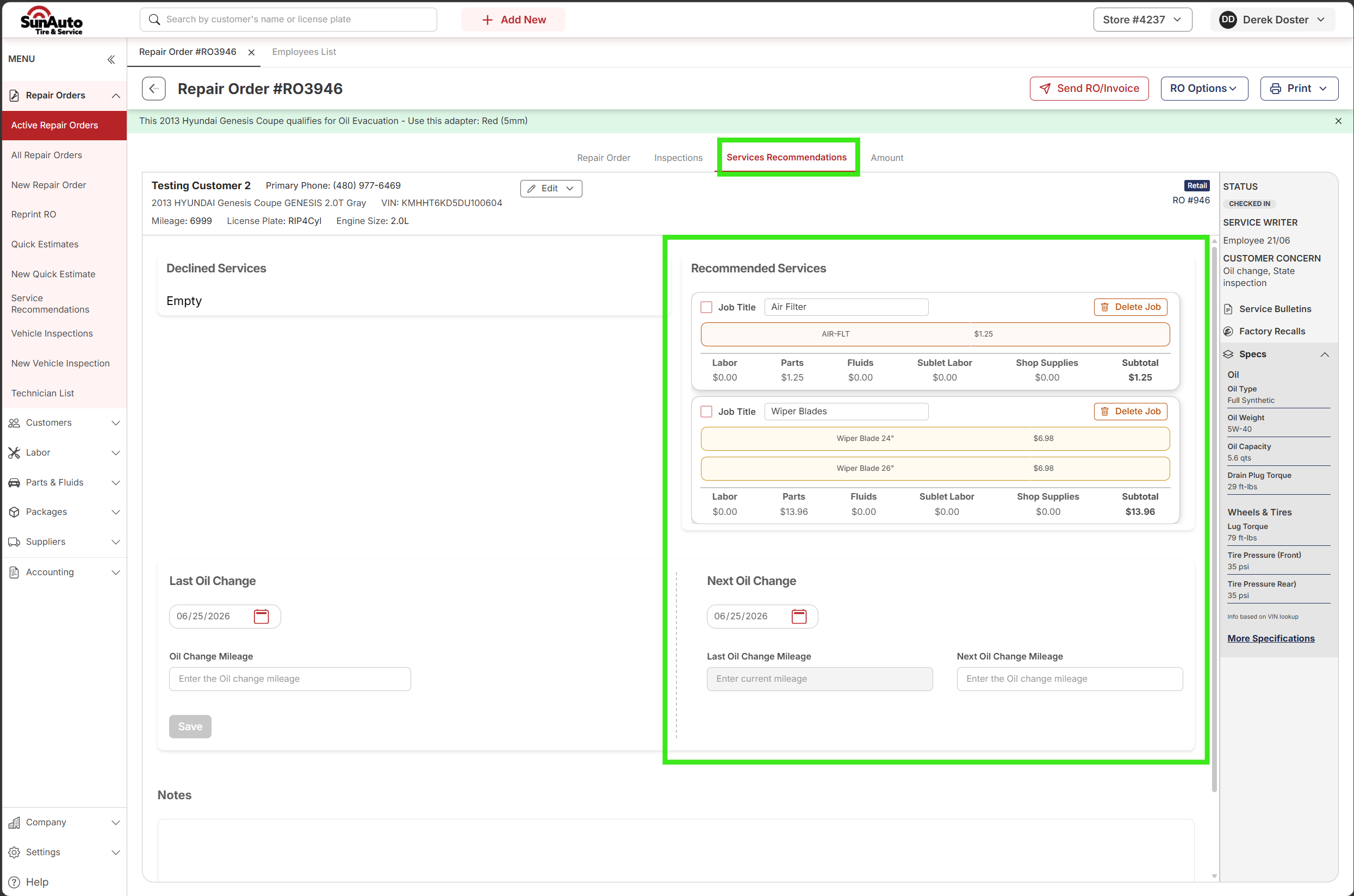
Step 4 — The Services Recommendations tab. Open the Services Recommendations tab on any RO to see both lists for this vehicle. Declined Services and Recommended Services live side-by-side; the vehicle history fields (Last / Next Oil Change, mileage, notes) live below.
 1
Services Recommendations tab — fourth tab across the top of the RO. The home for both lists going forward.
2
Declined Services panel — empty here because both transferred Jobs went to Recommended. If the customer had explicitly declined, they'd show here instead.
3
Recommended Services panel — important-but-not-urgent Jobs (Air Filter + Wiper Blades) with their full parts/labor breakdown. These carry forward to the next RO opened against this vehicle.
4
Vehicle service history — Last/Next Oil Change dates, mileage, and free-text Notes. Lives on the vehicle, not the RO — every RO sees the same values.
1
Services Recommendations tab — fourth tab across the top of the RO. The home for both lists going forward.
2
Declined Services panel — empty here because both transferred Jobs went to Recommended. If the customer had explicitly declined, they'd show here instead.
3
Recommended Services panel — important-but-not-urgent Jobs (Air Filter + Wiper Blades) with their full parts/labor breakdown. These carry forward to the next RO opened against this vehicle.
4
Vehicle service history — Last/Next Oil Change dates, mileage, and free-text Notes. Lives on the vehicle, not the RO — every RO sees the same values.
Watch the flow
Un-declining a Job
Stub — screenshots and walkthrough coming soon.
If a customer changes their mind during the same visit — or you transferred the wrong Job — you can move it back from Declined Services or Recommended Services onto the active RO.
This section will cover:
- Opening the Services Recommendations tab from the RO
- Pulling a Job back from Declined Services to active
- Pulling a Job back from Recommended Services to active
- What happens to line totals when a Job comes back on the RO
A few tips
- Pick the right destination — it's about urgency, not customer sentiment. Declined = needed today, they passed. Recommended = important long-term but not urgent. A customer saying no to a coolant flush at OEM interval is Recommended, not Declined.
- You can transfer more than one Job at once. Tick every Job you want moved before clicking Transfer Job — they all go to the same destination in one click.
- Transferred ≠ deleted. The Job is off the active RO but lives on the vehicle. The next RO opened against this vehicle will show both lists right away.
- Reversing it. If the customer changes their mind during this visit, you can pull the Job back onto the active RO — see Un-declining a Job below.
- Express Lane? Express Lane workflow uses Transfer Job + SRR coupon labor for the marketing follow-up. See The Express Lane Workflow (Step 10, Decline Services on the RO).