EOD Won't Balance
You're closing the day and the drawer count doesn't match what OverDrive expects — or End of Day won't complete at all.
You'll see this when
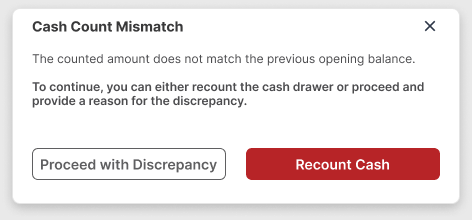
- You click End Day and get a Cash Count Mismatch window — "The counted amount does not match…":
- Or an Error banner at the top of the page: End of Day could not be completed. Please review the information and try again.
- If instead you see a yellow Warning — End of Day has already been completed for today — with the whole form greyed out, that's not a balance problem. Someone already closed the day; there's nothing to fix.
Closing clean doesn't mean the drawer balanced
The mismatch window only appears when the count is well off — a drawer that's a bit over or short will close without a peep, but whatever over or short there was is still recorded on every close. The count is blind on purpose: OverDrive never shows you what the drawer "should" hold, so there's nothing to aim for. Count what's actually in the till, carefully, every night — the number you certify is the number that goes on record.
Keep the line moving
This one hits after hours, so the pressure is going home, not a customer at the counter. Two things to know before you start chasing pennies:
- Everything you typed stays put. Recounting, closing windows, and working the checklist below won't wipe your count.
- OverDrive won't strand you. If the drawer really is over or short, you can close out with the variance on record (step 3) and go home. What you must not do is bend the counts until the numbers "work" — that hides a real problem instead of recording it.
Fix it
- Recount Cash. Click it in the mismatch window — it puts you back on the count with your numbers intact. Recount the till against what you typed; most variances are a miscount or a quantity in the wrong row.
- Still off? Work the usual suspects, in order. Fix what you find, then click End Day again:
- A payment that never got applied — taken at the counter but not posted to the RO.
- A Shop Supply (Paid Out) entry that was created but never received — cash left the drawer with nothing posted against it.
- A payment on the wrong RO — the money's in OverDrive, just not where you think.
- Still off after that? Put the variance on record. Click Proceed with Discrepancy, write what actually happened in the Reason box ("$20 short — recounted twice, no missed payments found"), and Confirm & Continue. The close carries on to the deposit as normal, and the day still ends.
Escalate
If EOD errors out even after the count is settled, or the mismatch window keeps coming back and you can't find the cause, post in the store's OverDrive support channel. Include:
- The business date you're trying to close
- The Total Cash you counted, and the drawer you're closing
- What you already checked from the list above
- A photo of the screen, error message included
Learn the flow
End of Day — the full close, start to finish, including the discrepancy windows and deposit changes. The float you're counting against was set at Start of Day.