Adding Coupons to a Repair Order
Coupons apply a discount to a Job on an open RO. In phase 1, they're simple: either a percentage off or a flat dollar amount off the parts, fluids, and labor on the Job, valid within a start and end date the manager sets when the coupon is created. That's it — no minimum-spend rules, no vehicle restrictions, no bundles.
Phase 1 scope
Coupons today are basic by design: % or $ off, with a date window. More coupon logic (bundles, eligibility rules, item-level targeting) is on the roadmap for later phases.
When to add a coupon
- The customer hands you a printed or digital coupon.
- The customer has a loyalty discount on file.
Add the coupon before the RO is closed. Once the RO is closed, the coupon can no longer be applied — not even by a manager. Catch it at the counter before you take payment.
The flow
Coupons attach to a Job on the RO, not the RO as a whole. If the customer has a coupon for an oil change, it lands on the oil change Job and discounts that Job's subtotal — every other Job on the RO is untouched.
Step through the slides — click the chips at the top, the Previous / Next buttons, or use the ← → arrow keys.
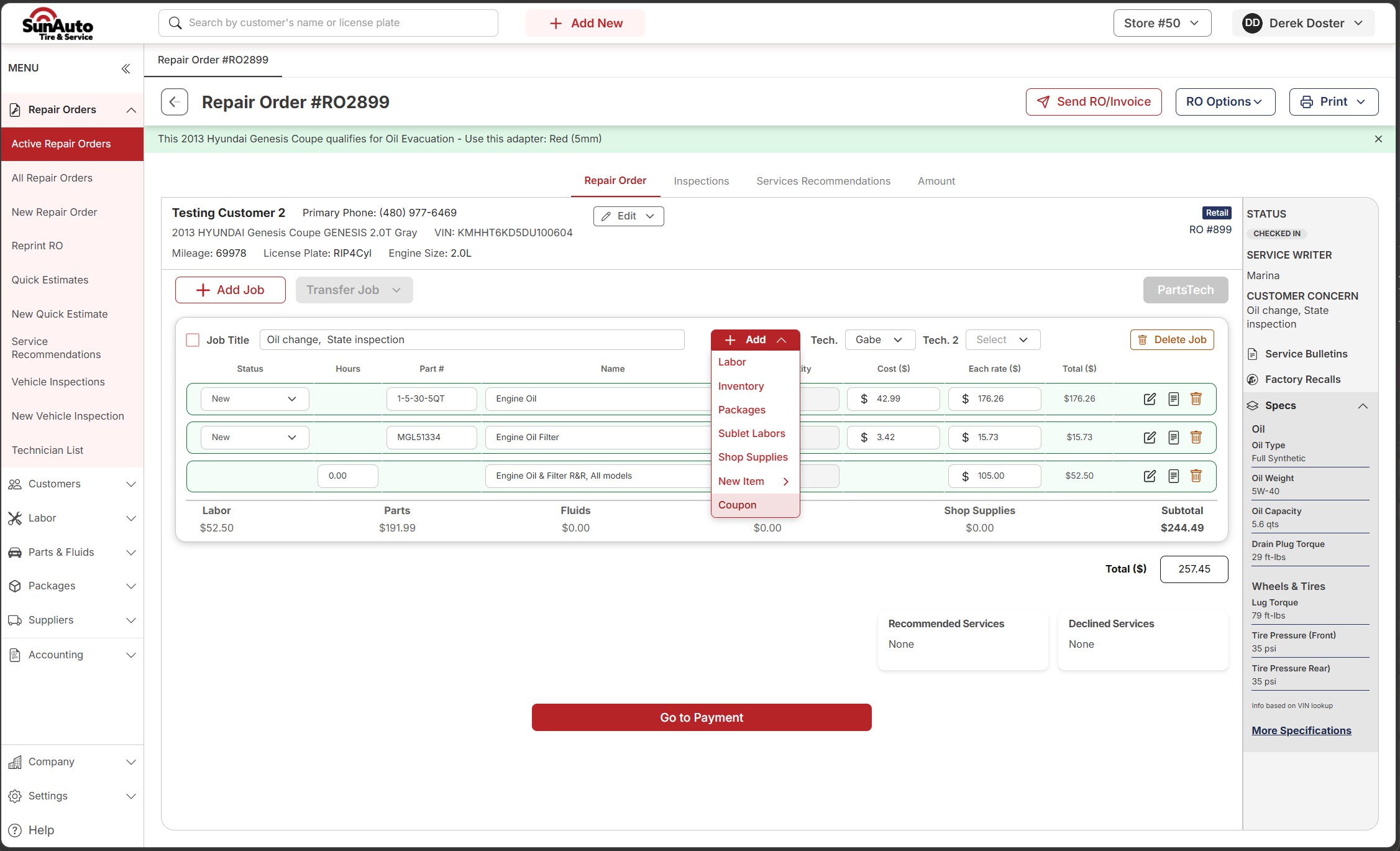
Step 1 — Open the coupon menu from the Job. On the open RO, find the Job you want to discount and click the red + Add button. Coupon is at the bottom of the dropdown.
 1
Vehicle-specific callout — OverDrive surfaces things the tech needs to know (here: which evac adapter the Hyundai Genesis takes). Read it before the Pit Tech starts.
2
The Job you're discounting — the coupon attaches to this Job. If the customer has a coupon for the oil change only, it lands here and nothing else on the RO is affected.
3
+ Add — the red button on the Job toolbar opens the dropdown for adding anything to this Job: parts, labor, packages, shop supplies, and Coupon.
4
Coupon — last item in the dropdown. Opens the Coupons List for selection.
1
Vehicle-specific callout — OverDrive surfaces things the tech needs to know (here: which evac adapter the Hyundai Genesis takes). Read it before the Pit Tech starts.
2
The Job you're discounting — the coupon attaches to this Job. If the customer has a coupon for the oil change only, it lands here and nothing else on the RO is affected.
3
+ Add — the red button on the Job toolbar opens the dropdown for adding anything to this Job: parts, labor, packages, shop supplies, and Coupon.
4
Coupon — last item in the dropdown. Opens the Coupons List for selection.
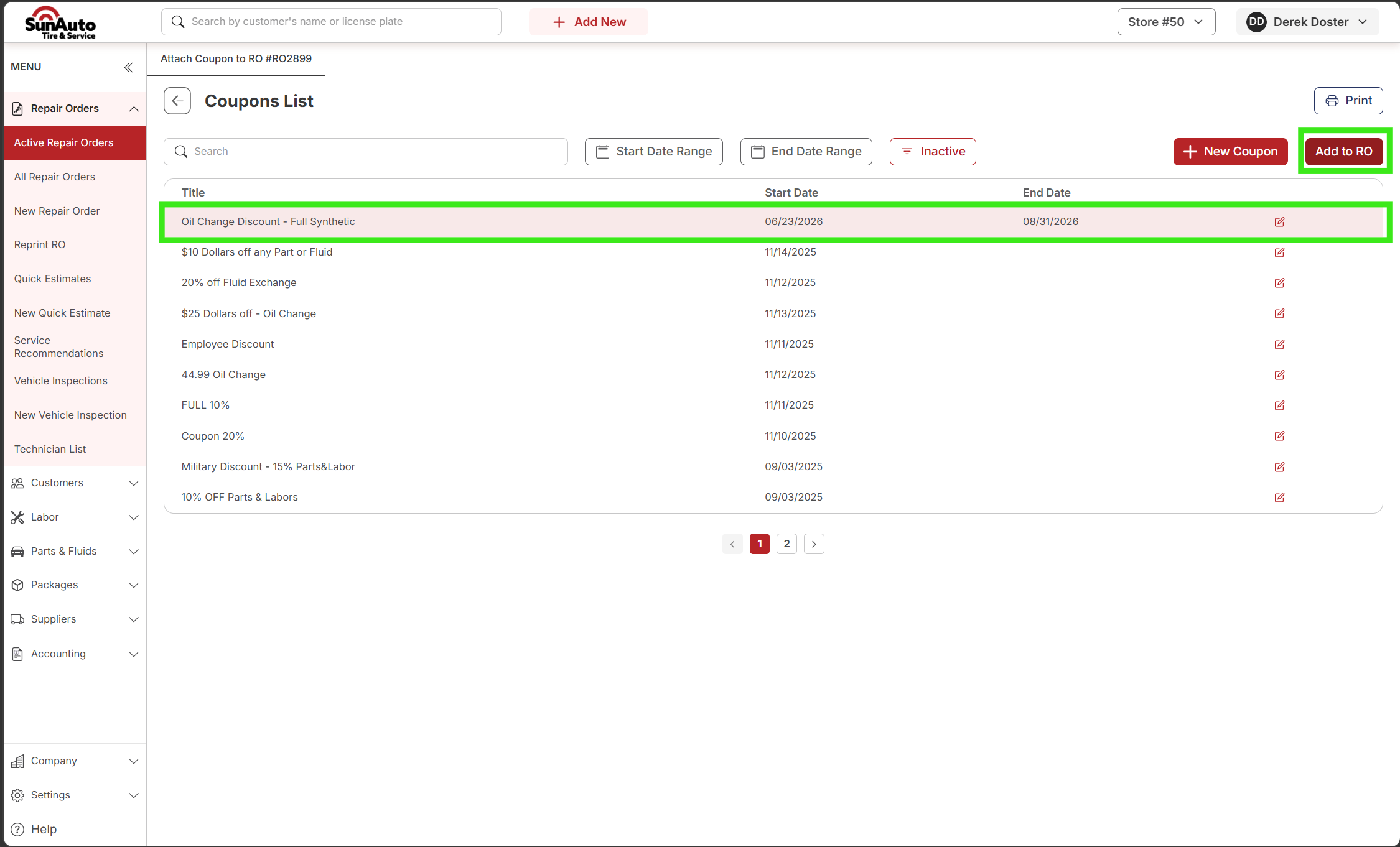
Step 2 — Pick the coupon from the list. The Coupons List opens — every active coupon in the system. Search by name, narrow by date range, and select the row that matches.
 1
Search — type a coupon name or code. Fastest way to find a specific one when the customer hands you a flyer with the title on it.
2
Date filters — Start Date Range / End Date Range. By default, the list shows currently active coupons. Use these to find one that ran in a specific window if the customer has an older printout.
3
Inactive toggle — a view into expired coupons. Expired coupons can't be applied — the system blocks it. The end date is already set a few days past the printed expiration to cover the natural gap, so if it's showing up here, it's truly done.
4
Select the row — click to highlight the coupon you want. Confirm the name and date range match what the customer's holding.
5
Add to RO — applies the selected coupon to the Job and closes the modal.
1
Search — type a coupon name or code. Fastest way to find a specific one when the customer hands you a flyer with the title on it.
2
Date filters — Start Date Range / End Date Range. By default, the list shows currently active coupons. Use these to find one that ran in a specific window if the customer has an older printout.
3
Inactive toggle — a view into expired coupons. Expired coupons can't be applied — the system blocks it. The end date is already set a few days past the printed expiration to cover the natural gap, so if it's showing up here, it's truly done.
4
Select the row — click to highlight the coupon you want. Confirm the name and date range match what the customer's holding.
5
Add to RO — applies the selected coupon to the Job and closes the modal.
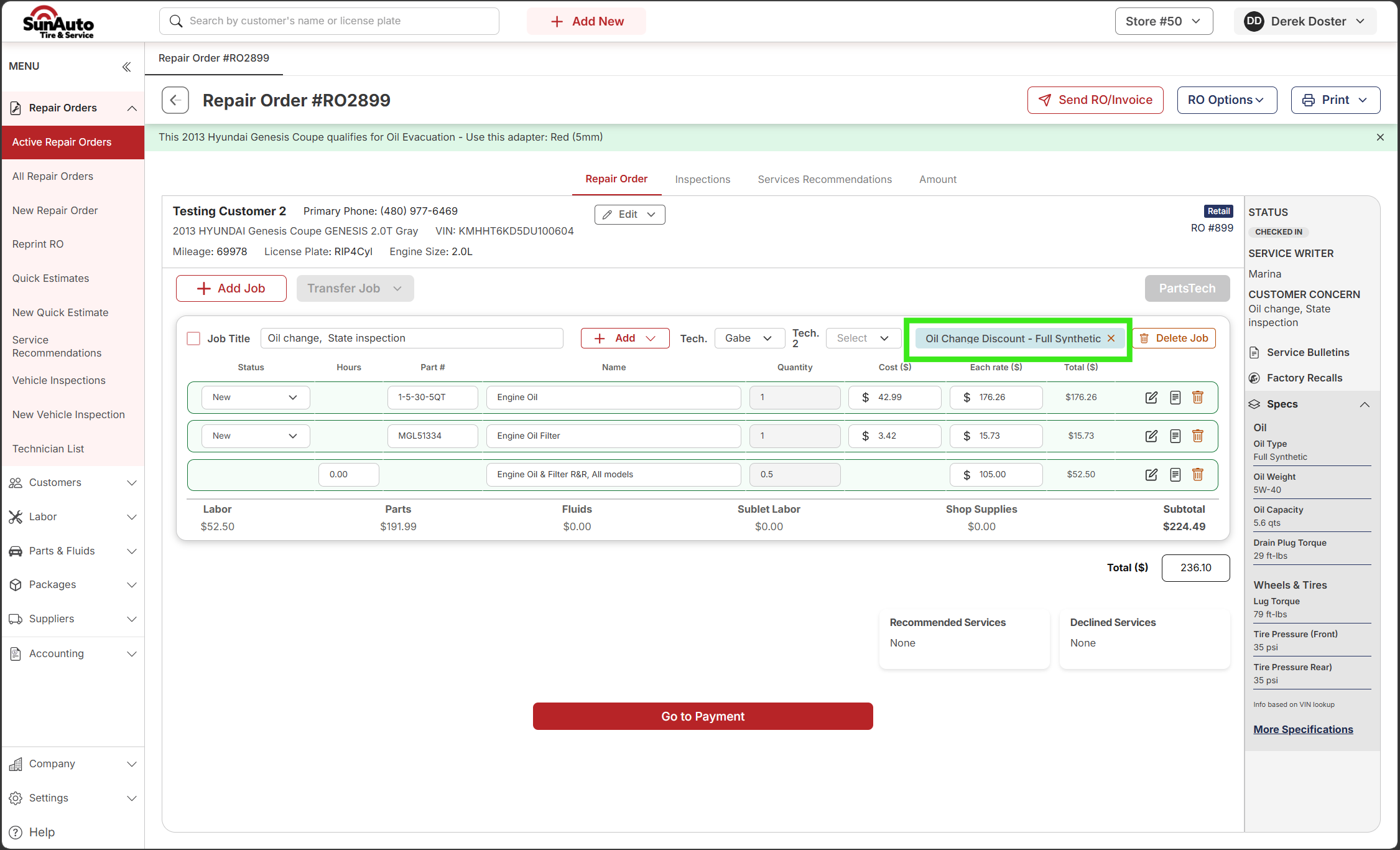
Step 3 — Confirm it's attached. Back on the RO, the coupon name shows on the Job header and the Total at the bottom updates with the discount applied.
 1
Coupon on the Job — the coupon name shows on the Job header so you can see at a glance which Job is discounted. Only one coupon per Job.
2
Line prices stay at full retail — the coupon doesn't touch individual line prices. The discount applies to the subtotal at the bottom, not the lines.
3
Subtotal reflects the discount — this is where the coupon actually shows up. The RO total drops accordingly. Sanity-check it against the customer's expectation before you take payment.
1
Coupon on the Job — the coupon name shows on the Job header so you can see at a glance which Job is discounted. Only one coupon per Job.
2
Line prices stay at full retail — the coupon doesn't touch individual line prices. The discount applies to the subtotal at the bottom, not the lines.
3
Subtotal reflects the discount — this is where the coupon actually shows up. The RO total drops accordingly. Sanity-check it against the customer's expectation before you take payment.
Creating new coupons is a manager task
The + New Coupon button in the top right of the Coupons List creates a coupon system-wide. That's a manager / admin function, not part of the advisor flow. Advisors apply existing coupons; they don't create them.
Watch the flow
Coupon types
In phase 1 there are exactly two:
| Type | What it does |
|---|---|
| Percent off | Reduces the Job's parts + fluids + labor subtotal by a percentage |
| Dollar off | Reduces the Job's parts + fluids + labor subtotal by a flat dollar amount |
Both run inside a manager-defined start date and end date. Outside that window, the coupon can't be applied.
A few tips
- One coupon per Job. The system enforces this — you can't stack two coupons on the same Job.
- Multiple Jobs on the RO? Each gets its own coupon. A multi-Job RO (oil change + brakes, for example) can carry two coupons total — one per Job — as long as each Job has its own eligible coupon.
- Closed RO = no coupon. Once the RO is closed, the coupon can't be applied. Not even by a manager. Catch it before you take payment.
- Expired coupons are blocked outright. The system won't apply them. The end date is already configured a few days past the printed expiration to cover the natural gap, so if the system says it's expired, it really is.
- Check the dates. Phase 1 coupons only validate against the start/end window. Confirm the customer's printout falls inside the active range before you add it.
- Removed by mistake? Use the row-level actions on the Job to remove the coupon and re-add it. The Job subtotal returns to undiscounted as soon as the coupon comes off.