The 11-step Express Lane Workflow (full breakdown)
Long-form walkthrough — every bullet, script, and cross-link spelled out. The at-a-glance version is the slide deck. This page is intentionally not in the left nav; reach it from the link at the bottom of the slide deck.
Each step links into the OverDrive module where the actual work happens.
1. Greet, set expectations, and offer water
- Warm greeting at arrival. Introduce yourself, use the guest's name if you know it, and ask what they're in for.
- State inspection? Call out "State Inspection, bay X."
- Explain the 50-point inspection, mention the callouts, offer water.
- Lobby request? Walk them to the lobby and use the tablet for presentation.
- No-DVI request? Have the team still capture 4 corners, rear, and dash. Note the guest ask on both the invoice and the DVI.
- Set the time expectation — about 20 minutes.
- Cabin air filter is interior? Ask permission before pulling the glovebox.
- Oil change? Reset the Oil Service Indicator Light while the vehicle is running.
2. Create the Repair Order
Pull the guest up in OverDrive and open the RO.
- Search first — by phone number. Verify address and email on the customer record.
- New guest? Add them and decode the VIN from the plate. See Creating an RO.
- Reason for visit goes on the RO. State inspection → ask for proof of insurance.
- Identify the right oil filter, oil type, and any special service details from the vehicle data on the RO.
- Drain plug torque ≠ 25 ft-lbs? Relay the correct spec to the Pit Tech.
- Check the EVAC list for evacuation capability.
Tech callouts at this step
- Call out the oil filter number to the bottom-side tech.
- Call "Evac, bay X" so they know we have the right product in stock and acknowledge.
- If an evacuation is required, announce it per the EVAC list to keep the line moving and prevent claims.
3. The Oil Conversation
- Inform the guest of the manufacturer's recommended oil type and grade.
- Answer questions. Tell them the price and what's included.
- Ask which oil they'd like to use.
- If they pick a different oil, note it on the invoice and make sure the correct product ends up on the line.
4. Communicate with the Technicians
- Inform the top-side tech of the oil type and quantity required by OEM.
- Let the tech complete the DVI without interruption.
- Listen for "Spot DVI complete, Bay X" — that's your cue to start prepping the recommendation conversation.
5. Prepare for the PM Conversation
When you hear "Spot DVI complete," have the guest place their keys on the dash and run through this checklist before walking out:
- Verify DVI accuracy in OverDrive.
- Check vehicle history — past services, Carfax on the RO.
- Check the mileage is accurate.
- Review the DVI results — every yellow and red.
- Open Packages in OverDrive and add any matching Maintenance / Repairs to the RO.
- Verify the assigned technicians on each Job.
- Match DVI checkboxes — anything yellow or red that the guest declines becomes a Transfer Job, not a deletion.
Packages walkthrough — coming soon
The OverDrive Packages module is under active development. Once shipped, the dedicated Packages page (under Repair Orders) will walk through how to pull a canned maintenance package onto a Job. Screenshots will live there; this step will deep-link in.
Yellow and red findings auto-build the estimate
OverDrive automatically promotes yellow/red DVI findings into Jobs on the RO. The customer doesn't gate that — you build the estimate, then walk them through it. See Completing a DVI for the mechanics.
Decision flow
6. Present the DVI to the Guest
- Provide a copy of the DVI, or display it on the monitor or store tablet.
- Highlight the benefits — transparency and credibility. The DVI is what separates Sun Auto from the corner shop.
- On the phone? Ask the guest to open the sent DVI on their device while you walk through it together.
7. Introduce the 4 P's
Open with the World Class Digital Vehicle Inspection and SunPRO framing — a process built to let guests make educated decisions without pressure or being separated from their vehicle.
Be clear about the lane's scope: we don't perform repair work in the Express Lane, but we have a customer loyalty discount for any repairs, services, or tires the guest schedules.
Then walk the 4 P's in order:
Builds trust before any spend. Always lead here.
Critical, immediate. Anchor in safety first.
Use OEM mileage intervals as your reference.
Present as optional or value-add.
Use the DVI photos as evidence — brake pads, tires, fluids. Don't describe what they can see for themselves.
8. Have the Conversation
Work down through the three tiers. For each, decide on the spot whether it stays in Express or gets a Service Forward Referral.
Protection & Safety (Red)
- Lead with: "Our top priority is your safety."
- Explain what was found, why it's unsafe, and what could happen if ignored.
- Use DVI visuals — photos of brake pads, tires, etc.
- Close with: "These are items I recommend today so your vehicle remains in operation and we keep you safe."
Prevention (Yellow)
- Transition with: "Next, let's look at what helps prevent future issues."
- Anchor in OEM mileage intervals.
- Example: "You're approaching the interval for a coolant flush — this helps prevent overheating and protects your engine long term."
Performance & Efficiency (Yellow)
- Transition with: "Finally, these are items that help your car perform its best and keep you comfortable."
- Present as optional or value-add.
- Example: "Replacing your air filter today will help your engine breathe better and improve efficiency."
When something is beyond Express Lane
- Offer a full inspection and arrange a service advisor to assist with transportation and discounts.
- Guest declines today? Offer to schedule an appointment, inform the sister store, and document the details on the appointment, work order, and invoice.
- Include the SRR code and details for any discounts. Note your name for credit.
- On invoice receipt, provide the SRR sticker for the referral discussed and hand over the flier.
9. Close the Conversation
Summarize the three tiers and set the next-visit expectation:
- Safety & Protection — address now
- Prevention — plan soon
- Performance — optional / future
Offer a prioritized plan. Use the guest's name. Example script:
"If it were my vehicle, I'd take care of the brakes first. John, our Certified Service Advisor, is working on the estimate now, and I'll be providing a coupon for 20% off your service. Next, I'd plan the fluid exchange at your next oil change, and note the cabin filter if you want to cover it as well. Today, we're finishing up your oil change with [Oil Grade], topping off fluids, and we'll have you back on the road in about [XX] minutes. Your total for today's services will be [$XX]."
10. Decline services on the RO
Anything the guest doesn't approve today becomes a declined Job on the RO. Do not delete it.
- Add the SRR labor to the RO from the labor catalog. (SRR is a labor item in OverDrive — transfer it onto the RO so it carries the discount and tracking.)
- Inform the guest of the 30-day discount opportunity.
- Apply any applicable coupon.
- Decline the Job on the invoice — see Declining Jobs for the exact flow.
Don't delete — decline
Deleting a Job removes it from the RO and from marketing's follow-up list. Declining keeps the breadcrumb. The 30-day discount only works if the declined Job is still on record.
The SRR conversation
When a red item won't be performed in the Express Lane, use this script to hand off to the sister store / Full Service side:
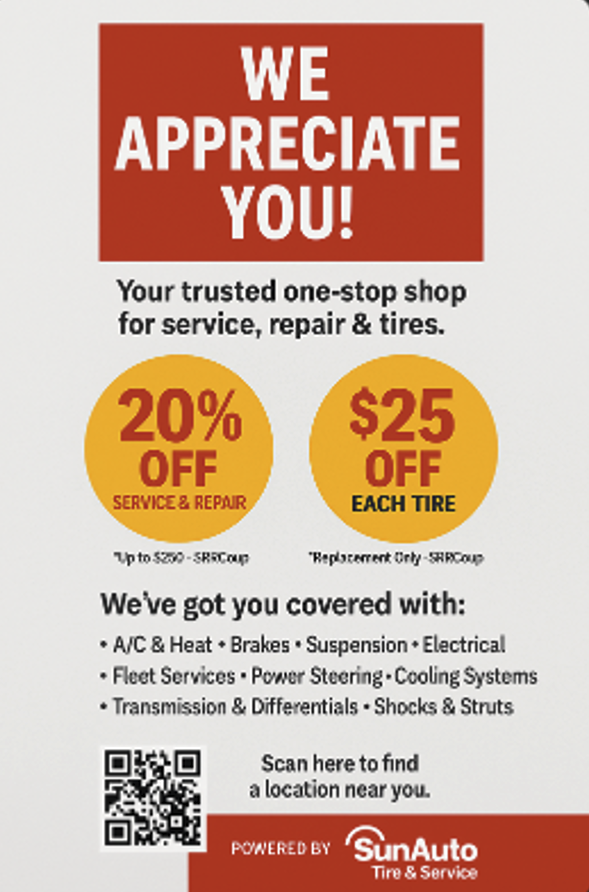
"When our Express Techs performed your vehicle inspection, they noticed your tread depth is within the range for a safety recommendation. We do not provide that service in the Express Lanes, but we do have an exceptional Full Service facility with certified technicians and world-class Service Advisors next door. I'd be happy to introduce you to [Service Advisor name] for a quote, and I can also provide you with $100 off a set of tires."
After the conversation, hand the guest the SRR flyer with the discount details:
11. Notify Express Technicians, review, and pay
Notify the techs
If any additional services or products got approved during the conversation, notify the Express technicians immediately so they can pull product and adjust the bay plan.
If there are delays, check in with the guest and provide updates every 3 minutes.
Review services on completion
- Walk through completed services, fluid top-offs, and recommendations.
- Ask if their service was satisfactory. If not, get the MOD involved.
- Remind them of upcoming mileage-based services.
- Accept payment and finalize the transaction — see Payments.
- Walk the guest out if they were in the waiting area, using Express Lane bays.
- Email the receipt — aim for 100% email capture for future marketing.
- Thank the guest and mention the customer satisfaction survey they'll receive.
Final sweep before they pull away
- Oil Service Indicator Light reset? Verify.
- Provide the receipt and sticker for next visit.
- Confirm any services set up for next time.
- Thank the guest and say goodbye.